Hello ,
You can find the complete Installation steps for Video Streaming Implementations in NS-2 here.
Installation of video-streaming implementations for the ns-2 simulator - CLICK HERE
Monday, 10 March 2014

Friday, 7 March 2014
Clustering in NS-2
How to Make clustering in NS-2?

Following are the steps to add clustering technique in your TCL file.
Step 1:
Configure the node object to have address type as Hierarchical.
$ns_ node-config -adhocRouting $opt(adhocRouting) \
-llType $opt(ll) \
-macType $opt(mac) \
-topoInstance $topo \
Step 6:
Consider creating nodes for wired Domain
#create nodes
set temp {0.0.0 0.1.0} ;# hierarchical addresses for domain 1 (Consider it as Wired)
for {set i 0} {$i < $num_wired_nodes} {incr i} {
set W($i) [$ns_ node [lindex $temp $i]]
}
Step 7:
Consider creating nodes for Wireless domain
set temp {1.0.0 1.0.1 1.0.2 1.0.3} ;# hier address to be used for wireless
#configure for mobile nodes
$ns_ node-config -wiredRouting OFF
for {set j 0} {$j < $opt(nn)} {incr j} {
set node_($j) [ $ns_ node [lindex $temp \
[expr $j+1]] ]
$node_($j) base-station [AddrParams addr2id \
[$BS(0) node-addr]]
}
Step 8 :
Please add the above relevant code in your TCL file. Take your Tcl code of any protocol used . Add the clustering code in ur tcl and see the result in NAM animator. the nodes will be in cluster based.
Following are the steps to add clustering technique in your TCL file.
Step 1:
Configure the node object to have address type as Hierarchical.
# set up for hierarchical routing
$ns_ node-config -addressType hierarchical
Step 2: No. of domains in the networking topology is 2
AddrParams set domain_num_ 2 ; # number of domains
Step 3:
No. of clusters in each of these domains is defined as "2 1" which indicates the first domain (wired) to have 2 clusters and the second (wireless) to have 1 cluster.
lappend cluster_num 2 1 ; # number of clusters in each domain
Step 4:
The No. of nodes in each of these clusters which is "1 1 4"; i.e one node in each of the first 2 clusters (in wired domain) and 4 nodes in the cluster in the wireless domain
AddrParams set cluster_num_ $cluster_num
lappend eilastlevel 1 1 4 ; # number of nodes in each cluster
AddrParams set nodes_num_ $eilastlevel ; # of each domain
Step 5:
Creation of topography which is nothing but networking area size defined in X && Y co-ordinates (Ex: Grid 1500 x 700)
# Create topography object
set topo [new Topography]
# define topology
$topo load_flatgrid $opt(x) $opt(y)
-llType $opt(ll) \
-macType $opt(mac) \
-topoInstance $topo \
Step 6:
Consider creating nodes for wired Domain
#create nodes
set temp {0.0.0 0.1.0} ;# hierarchical addresses for domain 1 (Consider it as Wired)
for {set i 0} {$i < $num_wired_nodes} {incr i} {
set W($i) [$ns_ node [lindex $temp $i]]
}
Step 7:
Consider creating nodes for Wireless domain
set temp {1.0.0 1.0.1 1.0.2 1.0.3} ;# hier address to be used for wireless
#configure for mobile nodes
$ns_ node-config -wiredRouting OFF
for {set j 0} {$j < $opt(nn)} {incr j} {
set node_($j) [ $ns_ node [lindex $temp \
[expr $j+1]] ]
$node_($j) base-station [AddrParams addr2id \
[$BS(0) node-addr]]
}
Step 8 :
Please add the above relevant code in your TCL file. Take your Tcl code of any protocol used . Add the clustering code in ur tcl and see the result in NAM animator. the nodes will be in cluster based.
Clustering in NS2
How to Make clustering in NS2?
Following are the steps to add clustering technique in your TCL file.
Step 1:
Configure the node object to have address type as Hierarchical.
$ns_ node-config -adhocRouting $opt(adhocRouting) \
-llType $opt(ll) \
-macType $opt(mac) \
-topoInstance $topo \
Step 6:
Consider creating nodes for wired Domain
#create nodes
set temp {0.0.0 0.1.0} ;# hierarchical addresses for domain 1 (Consider it as Wired)
for {set i 0} {$i < $num_wired_nodes} {incr i} {
set W($i) [$ns_ node [lindex $temp $i]]
}
Step 7:
Consider creating nodes for Wireless domain
set temp {1.0.0 1.0.1 1.0.2 1.0.3} ;# hier address to be used for wireless
#configure for mobile nodes
$ns_ node-config -wiredRouting OFF
for {set j 0} {$j < $opt(nn)} {incr j} {
set node_($j) [ $ns_ node [lindex $temp \
[expr $j+1]] ]
$node_($j) base-station [AddrParams addr2id \
[$BS(0) node-addr]]
}
Step 8 :
Please add the above relevant code in your TCL file. Take your Tcl code of any protocol used . Add the clustering code in ur tcl and see the result in NAM animator. the nodes will be in cluster based.
Following are the steps to add clustering technique in your TCL file.
Step 1:
Configure the node object to have address type as Hierarchical.
# set up for hierarchical routing
$ns_ node-config -addressType hierarchical
Step 2: No. of domains in the networking topology is 2
AddrParams set domain_num_ 2 ; # number of domains
Step 3:
No. of clusters in each of these domains is defined as "2 1" which indicates the first domain (wired) to have 2 clusters and the second (wireless) to have 1 cluster.
lappend cluster_num 2 1 ; # number of clusters in each domain
Step 4:
The No. of nodes in each of these clusters which is "1 1 4"; i.e one node in each of the first 2 clusters (in wired domain) and 4 nodes in the cluster in the wireless domain
AddrParams set cluster_num_ $cluster_num
lappend eilastlevel 1 1 4 ; # number of nodes in each cluster
AddrParams set nodes_num_ $eilastlevel ; # of each domain
Step 5:
Creation of topography which is nothing but networking area size defined in X && Y co-ordinates (Ex: Grid 1500 x 700)
# Create topography object
set topo [new Topography]
# define topology
$topo load_flatgrid $opt(x) $opt(y)
-llType $opt(ll) \
-macType $opt(mac) \
-topoInstance $topo \
Step 6:
Consider creating nodes for wired Domain
#create nodes
set temp {0.0.0 0.1.0} ;# hierarchical addresses for domain 1 (Consider it as Wired)
for {set i 0} {$i < $num_wired_nodes} {incr i} {
set W($i) [$ns_ node [lindex $temp $i]]
}
Step 7:
Consider creating nodes for Wireless domain
set temp {1.0.0 1.0.1 1.0.2 1.0.3} ;# hier address to be used for wireless
#configure for mobile nodes
$ns_ node-config -wiredRouting OFF
for {set j 0} {$j < $opt(nn)} {incr j} {
set node_($j) [ $ns_ node [lindex $temp \
[expr $j+1]] ]
$node_($j) base-station [AddrParams addr2id \
[$BS(0) node-addr]]
}
Step 8 :
Please add the above relevant code in your TCL file. Take your Tcl code of any protocol used . Add the clustering code in ur tcl and see the result in NAM animator. the nodes will be in cluster based.
Wired-Cum-Wireless Communication in Cluster based Netwroks
HI all,
This post is about wired and wireless combination in the networks . This uses domain based topology and uses clusters to create sub -domains. Base station is the main domain and wired and wireless are sub domains.
set opt(chan) Channel/WirelessChannel ;# channel type
set opt(prop) Propagation/TwoRayGround ;# radio-propagation model
set opt(netif) Phy/WirelessPhy ;# network interface type
set opt(mac) Mac/802_11 ;# MAC type
set opt(ifq) Queue/DropTail/PriQueue ;# interface queue type
set opt(ll) LL ;# link layer type
set opt(ant) Antenna/OmniAntenna ;# antenna model
set opt(ifqlen) 50 ;# max packet in ifq
set opt(nn) 3 ;# number of mobilenodes
set opt(adhocRouting) DSDV ;# routing protocol
set opt(cp) "" ;# connection pattern file
set opt(sc) "../mobility/scene/scen-3-test" ;# node movement file.
set opt(x) 670 ;# x coordinate of topology
set opt(y) 670 ;# y coordinate of topology
set opt(seed) 0.0 ;# seed for random number gen.
set opt(stop) 250 ;# time to stop simulation
set opt(ftp1-start) 160.0
set opt(ftp2-start) 170.0
set num_wired_nodes 2
set num_bs_nodes 1
# check for boundary parameters and random seed
if { $opt(x) == 0 || $opt(y) == 0 } {
puts "No X-Y boundary values given for wireless topology\n"
}
if {$opt(seed) > 0} {
puts "Seeding Random number generator with $opt(seed)\n"
ns-random $opt(seed)
}
# create simulator instance
set ns_ [new Simulator]
# set up for hierarchical routing
$ns_ node-config -addressType hierarchical
AddrParams set domain_num_ 2 ;# number of domains
lappend cluster_num 2 1 ;# number of clusters in each domain
AddrParams set cluster_num_ $cluster_num
lappend eilastlevel 1 1 4 ;# number of nodes in each cluster
AddrParams set nodes_num_ $eilastlevel ;# of each domain
set tracefd [open wireless2-out.tr w]
set namtrace [open wireless2-out.nam w]
$ns_ trace-all $tracefd
$ns_ namtrace-all-wireless $namtrace $opt(x) $opt(y)
# Create topography object
set topo [new Topography]
# define topology
$topo load_flatgrid $opt(x) $opt(y)
# create God
create-god [expr $opt(nn) + $num_bs_nodes]
#create wired nodes
set temp {0.0.0 0.1.0} ;# hierarchical addresses for wired domain
for {set i 0} {$i < $num_wired_nodes} {incr i} {
set W($i) [$ns_ node [lindex $temp $i]]
}
# configure for base-station node
$ns_ node-config -adhocRouting $opt(adhocRouting) \
-llType $opt(ll) \
-macType $opt(mac) \
-ifqType $opt(ifq) \
-ifqLen $opt(ifqlen) \
-antType $opt(ant) \
-propType $opt(prop) \
-phyType $opt(netif) \
-channelType $opt(chan) \
-topoInstance $topo \
-wiredRouting ON \
-agentTrace ON \
-routerTrace OFF \
-macTrace OFF
#create base-station node
set temp {1.0.0 1.0.1 1.0.2 1.0.3} ;# hier address to be used for wireless
;# domain
set BS(0) [$ns_ node [lindex $temp 0]]
$BS(0) random-motion 0 ;# disable random motion
#provide some co-ord (fixed) to base station node
$BS(0) set X_ 1.0
$BS(0) set Y_ 2.0
$BS(0) set Z_ 0.0
# create mobilenodes in the same domain as BS(0)
# note the position and movement of mobilenodes is as defined
# in $opt(sc)
#configure for mobilenodes
$ns_ node-config -wiredRouting OFF
for {set j 0} {$j < $opt(nn)} {incr j} {
set node_($j) [ $ns_ node [lindex $temp \
[expr $j+1]] ]
$node_($j) base-station [AddrParams addr2id \
[$BS(0) node-addr]]
}
#create links between wired and BS nodes
$ns_ duplex-link $W(0) $W(1) 5Mb 2ms DropTail
$ns_ duplex-link $W(1) $BS(0) 5Mb 2ms DropTail
$ns_ duplex-link-op $W(0) $W(1) orient down
$ns_ duplex-link-op $W(1) $BS(0) orient left-down
# setup TCP connections
set tcp1 [new Agent/TCP]
$tcp1 set class_ 2
set sink1 [new Agent/TCPSink]
$ns_ attach-agent $node_(0) $tcp1
$ns_ attach-agent $W(0) $sink1
$ns_ connect $tcp1 $sink1
set ftp1 [new Application/FTP]
$ftp1 attach-agent $tcp1
$ns_ at $opt(ftp1-start) "$ftp1 start"
set tcp2 [new Agent/TCP]
$tcp2 set class_ 2
set sink2 [new Agent/TCPSink]
$ns_ attach-agent $W(1) $tcp2
$ns_ attach-agent $node_(2) $sink2
$ns_ connect $tcp2 $sink2
set ftp2 [new Application/FTP]
$ftp2 attach-agent $tcp2
$ns_ at $opt(ftp2-start) "$ftp2 start"
# source connection-pattern and node-movement scripts
if { $opt(cp) == "" } {
puts "*** NOTE: no connection pattern specified."
set opt(cp) "none"
} else {
puts "Loading connection pattern..."
source $opt(cp)
}
if { $opt(sc) == "" } {
puts "*** NOTE: no scenario file specified."
set opt(sc) "none"
} else {
puts "Loading scenario file..."
source $opt(sc)
puts "Load complete..."
}
# Define initial node position in nam
for {set i 0} {$i < $opt(nn)} {incr i} {
# 20 defines the node size in nam, must adjust it according to your
# scenario
# The function must be called after mobility model is defined
$ns_ initial_node_pos $node_($i) 20
}
# Tell all nodes when the simulation ends
for {set i } {$i < $opt(nn) } {incr i} {
$ns_ at $opt(stop).0 "$node_($i) reset";
}
$ns_ at $opt(stop).0 "$BS(0) reset";
$ns_ at $opt(stop).0002 "puts \"NS EXITING...\" ; $ns_ halt"
$ns_ at $opt(stop).0001 "stop"
proc stop {} {
global ns_ tracefd namtrace
# $ns_ flush-trace
close $tracefd
close $namtrace
}
# informative headers for CMUTracefile
puts $tracefd "M 0.0 nn $opt(nn) x $opt(x) y $opt(y) rp \
$opt(adhocRouting)"
puts $tracefd "M 0.0 sc $opt(sc) cp $opt(cp) seed $opt(seed)"
puts $tracefd "M 0.0 prop $opt(prop) ant $opt(ant)"
puts "Starting Simulation..."
$ns_ run
Copyright (c) 1997 Regents of the University of California.
This post is about wired and wireless combination in the networks . This uses domain based topology and uses clusters to create sub -domains. Base station is the main domain and wired and wireless are sub domains.
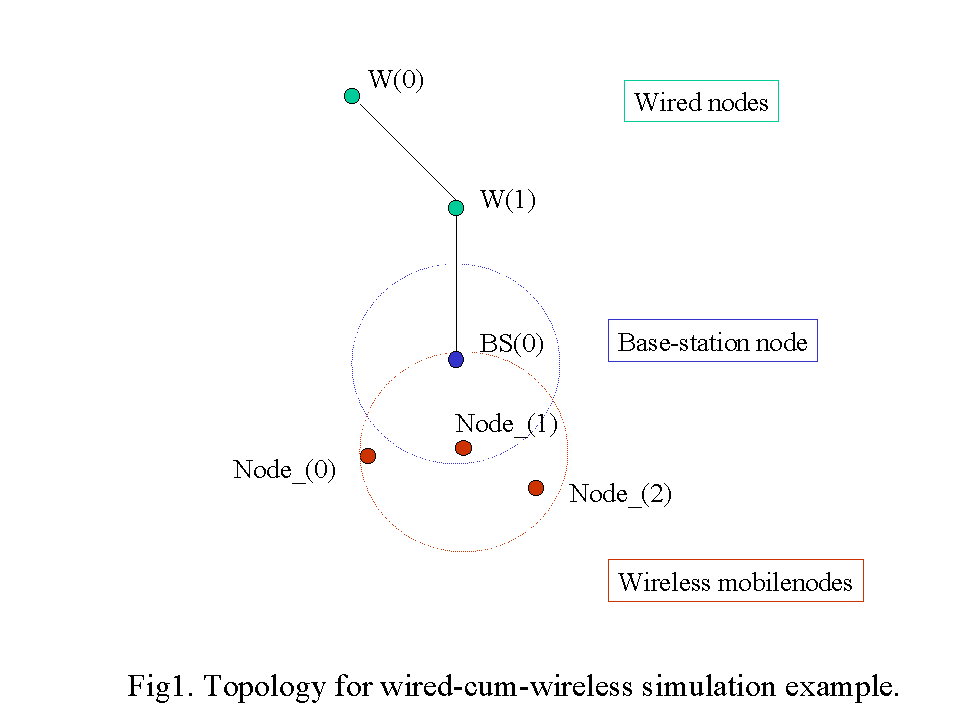
set opt(chan) Channel/WirelessChannel ;# channel type
set opt(prop) Propagation/TwoRayGround ;# radio-propagation model
set opt(netif) Phy/WirelessPhy ;# network interface type
set opt(mac) Mac/802_11 ;# MAC type
set opt(ifq) Queue/DropTail/PriQueue ;# interface queue type
set opt(ll) LL ;# link layer type
set opt(ant) Antenna/OmniAntenna ;# antenna model
set opt(ifqlen) 50 ;# max packet in ifq
set opt(nn) 3 ;# number of mobilenodes
set opt(adhocRouting) DSDV ;# routing protocol
set opt(cp) "" ;# connection pattern file
set opt(sc) "../mobility/scene/scen-3-test" ;# node movement file.
set opt(x) 670 ;# x coordinate of topology
set opt(y) 670 ;# y coordinate of topology
set opt(seed) 0.0 ;# seed for random number gen.
set opt(stop) 250 ;# time to stop simulation
set opt(ftp1-start) 160.0
set opt(ftp2-start) 170.0
set num_wired_nodes 2
set num_bs_nodes 1
# check for boundary parameters and random seed
if { $opt(x) == 0 || $opt(y) == 0 } {
puts "No X-Y boundary values given for wireless topology\n"
}
if {$opt(seed) > 0} {
puts "Seeding Random number generator with $opt(seed)\n"
ns-random $opt(seed)
}
# create simulator instance
set ns_ [new Simulator]
# set up for hierarchical routing
$ns_ node-config -addressType hierarchical
AddrParams set domain_num_ 2 ;# number of domains
lappend cluster_num 2 1 ;# number of clusters in each domain
AddrParams set cluster_num_ $cluster_num
lappend eilastlevel 1 1 4 ;# number of nodes in each cluster
AddrParams set nodes_num_ $eilastlevel ;# of each domain
set tracefd [open wireless2-out.tr w]
set namtrace [open wireless2-out.nam w]
$ns_ trace-all $tracefd
$ns_ namtrace-all-wireless $namtrace $opt(x) $opt(y)
# Create topography object
set topo [new Topography]
# define topology
$topo load_flatgrid $opt(x) $opt(y)
# create God
create-god [expr $opt(nn) + $num_bs_nodes]
#create wired nodes
set temp {0.0.0 0.1.0} ;# hierarchical addresses for wired domain
for {set i 0} {$i < $num_wired_nodes} {incr i} {
set W($i) [$ns_ node [lindex $temp $i]]
}
# configure for base-station node
$ns_ node-config -adhocRouting $opt(adhocRouting) \
-llType $opt(ll) \
-macType $opt(mac) \
-ifqType $opt(ifq) \
-ifqLen $opt(ifqlen) \
-antType $opt(ant) \
-propType $opt(prop) \
-phyType $opt(netif) \
-channelType $opt(chan) \
-topoInstance $topo \
-wiredRouting ON \
-agentTrace ON \
-routerTrace OFF \
-macTrace OFF
#create base-station node
set temp {1.0.0 1.0.1 1.0.2 1.0.3} ;# hier address to be used for wireless
;# domain
set BS(0) [$ns_ node [lindex $temp 0]]
$BS(0) random-motion 0 ;# disable random motion
#provide some co-ord (fixed) to base station node
$BS(0) set X_ 1.0
$BS(0) set Y_ 2.0
$BS(0) set Z_ 0.0
# create mobilenodes in the same domain as BS(0)
# note the position and movement of mobilenodes is as defined
# in $opt(sc)
#configure for mobilenodes
$ns_ node-config -wiredRouting OFF
for {set j 0} {$j < $opt(nn)} {incr j} {
set node_($j) [ $ns_ node [lindex $temp \
[expr $j+1]] ]
$node_($j) base-station [AddrParams addr2id \
[$BS(0) node-addr]]
}
#create links between wired and BS nodes
$ns_ duplex-link $W(0) $W(1) 5Mb 2ms DropTail
$ns_ duplex-link $W(1) $BS(0) 5Mb 2ms DropTail
$ns_ duplex-link-op $W(0) $W(1) orient down
$ns_ duplex-link-op $W(1) $BS(0) orient left-down
# setup TCP connections
set tcp1 [new Agent/TCP]
$tcp1 set class_ 2
set sink1 [new Agent/TCPSink]
$ns_ attach-agent $node_(0) $tcp1
$ns_ attach-agent $W(0) $sink1
$ns_ connect $tcp1 $sink1
set ftp1 [new Application/FTP]
$ftp1 attach-agent $tcp1
$ns_ at $opt(ftp1-start) "$ftp1 start"
set tcp2 [new Agent/TCP]
$tcp2 set class_ 2
set sink2 [new Agent/TCPSink]
$ns_ attach-agent $W(1) $tcp2
$ns_ attach-agent $node_(2) $sink2
$ns_ connect $tcp2 $sink2
set ftp2 [new Application/FTP]
$ftp2 attach-agent $tcp2
$ns_ at $opt(ftp2-start) "$ftp2 start"
# source connection-pattern and node-movement scripts
if { $opt(cp) == "" } {
puts "*** NOTE: no connection pattern specified."
set opt(cp) "none"
} else {
puts "Loading connection pattern..."
source $opt(cp)
}
if { $opt(sc) == "" } {
puts "*** NOTE: no scenario file specified."
set opt(sc) "none"
} else {
puts "Loading scenario file..."
source $opt(sc)
puts "Load complete..."
}
# Define initial node position in nam
for {set i 0} {$i < $opt(nn)} {incr i} {
# 20 defines the node size in nam, must adjust it according to your
# scenario
# The function must be called after mobility model is defined
$ns_ initial_node_pos $node_($i) 20
}
# Tell all nodes when the simulation ends
for {set i } {$i < $opt(nn) } {incr i} {
$ns_ at $opt(stop).0 "$node_($i) reset";
}
$ns_ at $opt(stop).0 "$BS(0) reset";
$ns_ at $opt(stop).0002 "puts \"NS EXITING...\" ; $ns_ halt"
$ns_ at $opt(stop).0001 "stop"
proc stop {} {
global ns_ tracefd namtrace
# $ns_ flush-trace
close $tracefd
close $namtrace
}
# informative headers for CMUTracefile
puts $tracefd "M 0.0 nn $opt(nn) x $opt(x) y $opt(y) rp \
$opt(adhocRouting)"
puts $tracefd "M 0.0 sc $opt(sc) cp $opt(cp) seed $opt(seed)"
puts $tracefd "M 0.0 prop $opt(prop) ant $opt(ant)"
puts "Starting Simulation..."
$ns_ run
Copyright (c) 1997 Regents of the University of California.
IMEP protocol
What is IMEP protocol?
The primary purpose of the Internet MANET Encapsulation Protocol (IMEP) is to improve overall network performance by reducing the No. of network control packet broadcasts through encapsulation and aggregation of multiple MANET control packets (e.g. routing protocol packets, acknowledgements, link status sensing packets, ``network-level" address resolution, etc.) into larger IMEP messages. Usage of the IMEP is desirable because per-message, multiple access delay in contention-based schemes such as CSMA/CA, IEEE 802.11, FAMA etc. is significant, and thus favors the use of fewer, larger messages. It also may be useful in reservation-based, time-slotted access schemes where smaller packets must be aggregated into appropriately-sized IP packets for transmission in a given time slot. Upper Layer Protocols (ULP) *other than routing* may make use of this encapsulation functionality for the same purpose.
you can find more here: An Internet MANET Encapsulation Protocol (IMEP) Specification
Saturday, 1 March 2014
Compiling and Building Ns-2 project
Hello pals,
This post comes after long time . This time i would like to tell you about compiling and building Ns-2 project.
Reasons for compilation:
- Added new versions of xgraph , tcl/tk , nam , otcl , perl etc... to the existing NS-2 project
- Made any changes in the C++ files. like .cc files
- Added any patches to the existing NS-2 code
Steps to be followed for compilation and build process
precondition:
- Must and should posses C++ compiler (gcc package).
commands:
- cd into the Ns-2 directory(for example ~ns-allinone-2.xx/ns-2.xx)
- run
./configure (./configure try to auto-detect all the packages ns requires to build. Auto-detection checks sensible places (like /usr/local) and the directory above current direcory.) - run
make
- Verification and validation:
./validate
Compiling and Building NS2 project
Hello pals,
This post comes after long time . This time i would like to tell you about compiling and building Ns-2 project.
Reasons for compilation:
- Added new versions of xgraph , tcl/tk , nam , otcl , perl etc... to the existing NS-2 project
- Made any changes in the C++ files. like .cc files
- Added any patches to the existing NS-2 code
Steps to be followed for compilation and build process
precondition:
- Must and should posses C++ compiler (gcc package).
commands:
- cd into the Ns-2 directory(for example ~ns-allinone-2.xx/ns-2.xx)
- run
./configure (./configure try to auto-detect all the packages ns requires to build. Auto-detection checks sensible places (like /usr/local) and the directory above current direcory.) - run
make
- Verification and validation:
./validate
Subscribe to:
Posts (Atom)